Built-in Voices
What MIDIpad plays the chords with
The Voice picker in the control bar chooses what MIDIpad plays the chords with. There are twelve voices, and none of them is a preset in the usual sense - each is an oscillator with three dials, and MIDIpad supplies the rest: the six strings, how they're struck, and how they decay.
That's why there are no pads and no evolving textures in the list. Anything with its own envelope or its own idea of polyphony would be fighting the instrument.
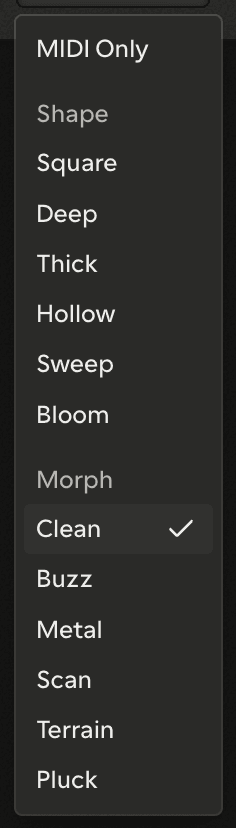
MIDI Only
The first entry in the list is MIDI Only. It silences MIDIpad's own sound and leaves the MIDI ports running exactly as they were. Choosing a voice again turns the sound back on, and the picker remembers which voice you had. There is no separate on/off switch - the picker is the switch.
Two groups, two dial sets
Below MIDI Only the voices sit in two groups: Shape and Morph. The groups aren't a genre split - they tell you which three dials you get. Every voice in Shape has the same three; every voice in Morph has a different same three.
| Group | Dials |
|---|---|
| Shape | Timbre · Color · Grit |
| Morph | Harmonics · Timbre · Morph |
The dials sit beside the picker, icon-only; point at one and the help line reads its name and value. Double-tap a dial to reset it, and crossing between groups relabels and resets the set - the group header is the warning that it's about to happen.
The dials shape only MIDIpad's own sound. Nothing you do to them changes what leaves the MIDI ports - the instrument's response to your hands lives in the Instrument Settings panel, not here.
The two groups are two pieces of synthesis: Shape is built on the code behind Braids, Morph on Plaits - two Mutable Instruments modules written by Émilie Gillet and released under the MIT licence. The names, the grouping, the dials and everything the instrument does with them are MIDIpad's own. MIDIpad is an independent product, not affiliated with or endorsed by Mutable Instruments; the full licence text, alongside everything else MIDIpad is built on, is in the app under Settings → About.
The twelve
| Shape | What it is |
|---|---|
| Square | A hollow, woody square with a second one an octave below giving it a floor |
| Deep | A sawtooth working up top with a square an octave below carrying the weight |
| Thick | A sawtooth and a square pushed apart in phase, so one oscillator sounds like several |
| Hollow | A sawtooth with a notch cut out of its middle, leaving it hollow and faintly nasal |
| Sweep | One oscillator running the whole way through triangle, sawtooth, square and pulse |
| Bloom | A sine folded back on itself, pure at rest and brassy once you push it |
| Morph | What it is |
|---|---|
| Clean | A square and a sawtooth side by side, with nothing added or coloured |
| Buzz | A sine bent out of shape until it buzzes, round at rest and reedy as the dials open |
| Metal | A triangle folded back on itself until it rings bright and bell-hard |
| Scan | A grid of stored waveforms to move around in, where the travelling is the point |
| Terrain | A needle tracing a loop across a landscape, reading its height as the wave |
| Pluck | A struck string left to ring, with its overtones tuned slightly off true |
Clean is the voice MIDIpad opens with. The descriptions don't appear in the list itself - an entry is one word, and pointing at it puts its sentence in the help line.
What the voice responds to
The internal voice plays the instrument's full expression: it swells and fades with each string's energy and brightens with your touch, whatever the MIDI port is sending. Six strings, six voices - there is no voice stealing, and a full strum sounds all six.
Chords and Drums are never audible at the same time, which is why there is one Volume for both.
What a licence changes here
The dials and the Volume are free in every tier, and the internal sound plays the full instrument whether or not you have a licence - it is how you hear what a licence buys before you buy it.
The voices themselves are split. Demo Mode plays three: Clean, Square and Pluck. The other nine are licensed. Locked voices stay in the picker rather than being hidden, dimmed and unselectable, so you can see the whole palette before you buy it.