Keyswitches
Because sometimes the old ways work best.
Sampled instruments often switch articulation with a note below the playable range, or with a CC. Keyswitches let the controls you're already playing with send those messages as you play, so a light pull of the left trigger can be palm mutes and a deep one can be full sustains.
They're on the MIDI tab of the Chords panel, under Keyswitches.
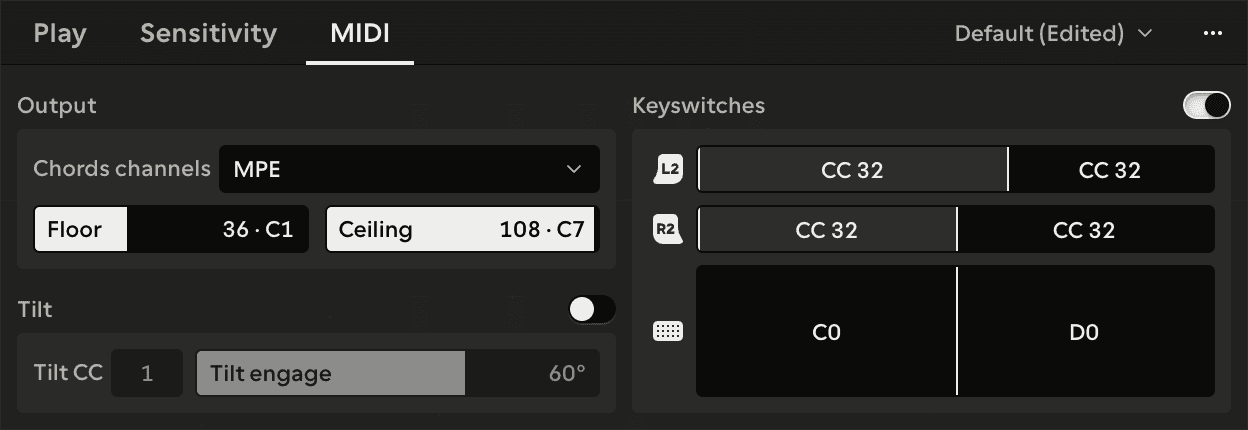
Zones
Three controls can each be split into up to eight zones:
- L2, along the pull of the left trigger.
- R2, along the pull of the right trigger.
- The touchpad, across the strings, the same direction as timbre.
Each control has a picture in the group. Click the picture to split it where you clicked, drag a line to move it, and double-click a line to merge the zones either side. Click a zone's label to set what it sends or Remove it, and drag a label onto another zone to swap them over.
When the control moves into a zone, MIDIpad sends that zone's message once, before anything the control plays. It doesn't send it again until the control moves into a different zone.
What a zone sends
- Note sends a short note at the velocity you set. New ones start at velocity 1, which is close to silent on an instrument that plays the note instead of reading it as a switch.
- CC sends one CC at the value you set. New ones start on CC 32 at 127, which a lot of sample libraries use for articulations.
If you pick CC74, or the Tilt CC while Tilt is on, the picker marks it In use, because MIDIpad already sends that CC.
Keyswitches go out on channel 1, or on every string's channel under Multi-channel - see MIDI and MPE. The switch at the top of the group turns them all off without losing your zones.
Keyswitches are part of the preset, so each sampled instrument can have its own.