Drum notes and channels
You can get a surprising amount out of four notes.
Drums sends on MIDIpad Drums. Out of the box it sends standard General MIDI percussion notes, so a GM-mapped drum kit works without you configuring anything.
| Drum | Note |
|---|---|
| Kick | 36 |
| Snare | 38 |
| Hi-hat | 42 |
| Open hi-hat | 46 |
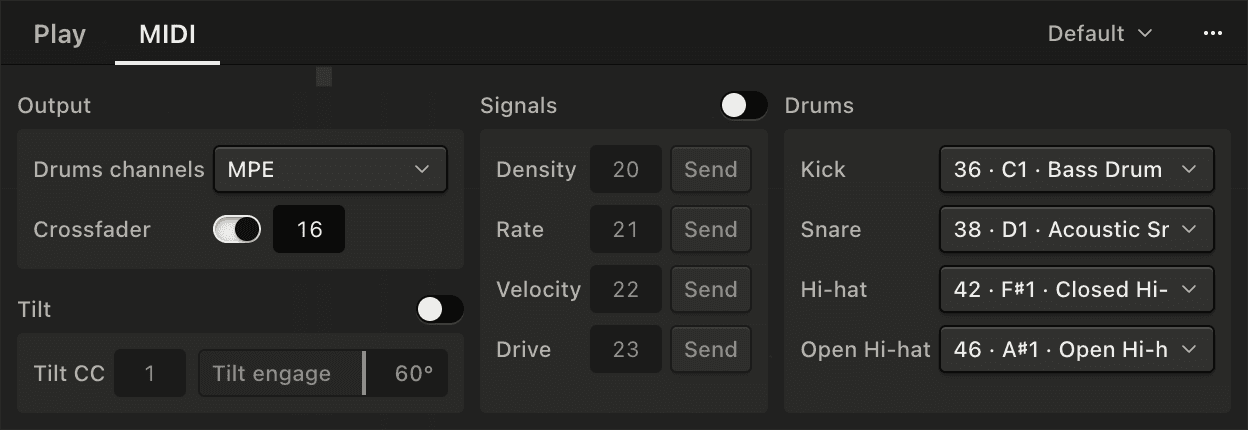
All four notes can be changed on the MIDI tab of the Drums panel. Drums channels, on the same tab, sets how they're sent.
One channel, or one per drum
It's the same choice as the Chords port's, minus Poly aftertouch. It's in the Instrument menu too.
MPE, the default, puts each drum on its own channel behind a master on 1: the kick on 2, the snare on 3, the hi-hats on 4. It announces the MPE zone, and sends how far you're pushing each drum's controls as pressure and slide on its channel. The kick and the snare send both from their control. The hi-hat's pressure comes from the left stick and its slide from the left trigger. Full message details are in the MIDI reference.
Multi-channel is the same without the master channel: the kick on 1, the snare on 2, the hi-hats on 3, with slide and pressure and no MPE announcement.
Single channel puts everything on channel 1 with no pressure or slide. The demo sends Single channel.
The crossfader
On a Sony pad the touchpad is a crossfader, sent as CC 16 on channel 1 in every channel mode. You can change the CC, or turn the crossfader off, under Crossfader on the MIDI tab. Slide a finger across it to move the fader: 0 at the left edge, 127 at the right. Map it to a crossfader, a filter or a macro in your DAW.
Click the pad to jump the fader: the left third jumps it to 0, the middle to 64, the right third to 127, and it stays there until you lift the finger, so you can cut quickly to each side or the center without needing to be precise about where you tap. Click somewhere else to jump again.
The fader stays where it is when you lift your finger.
Deadzone
There's a bit of deadzone at the bottom of the touchpad to prevent accidental touches when the sticks are pushed upwards. Clicking ignores the deadzone, so you can jump to top or bottom without taking a thumb off either stick.
Signals
Drums can also send four CCs based on what it's playing, so you can use the drum pattern to control effects or synth parameters. They're off by default. Turn them on under Signals on the MIDI tab.
| Signal | Follows | Default CC |
|---|---|---|
| Density | How full the 16th-note grid is | 20 |
| Rate | How many hits per second | 21 |
| Velocity | How hard the recent hits are, on average | 22 |
| Drive | How many hits and how hard, together | 23 |
Each one has a Send button that sends its CC once, so your DAW's MIDI Learn can pick it up without the drums playing. They go out on channel 1, like the crossfader, and they're shown in the main window under the falling notes.
Tilt
Roll the pad onto its side, either way, and it sends a CC on channel 1: 0 when the pad is flat, rising to 127 as you roll. It's off by default. Turn it on under Tilt on the MIDI tab, where Tilt CC picks the CC (CC 1, the mod wheel, by default) and Tilt engage sets how far you roll before it reaches 127.