Changing the character
Sometimes you want drum 'n bass, sometimes you want death metal.
Everything about how Drums plays is on the Drums panel at the bottom of the main window. These are on its Play tab. Double-click any slider to put it back to its default.
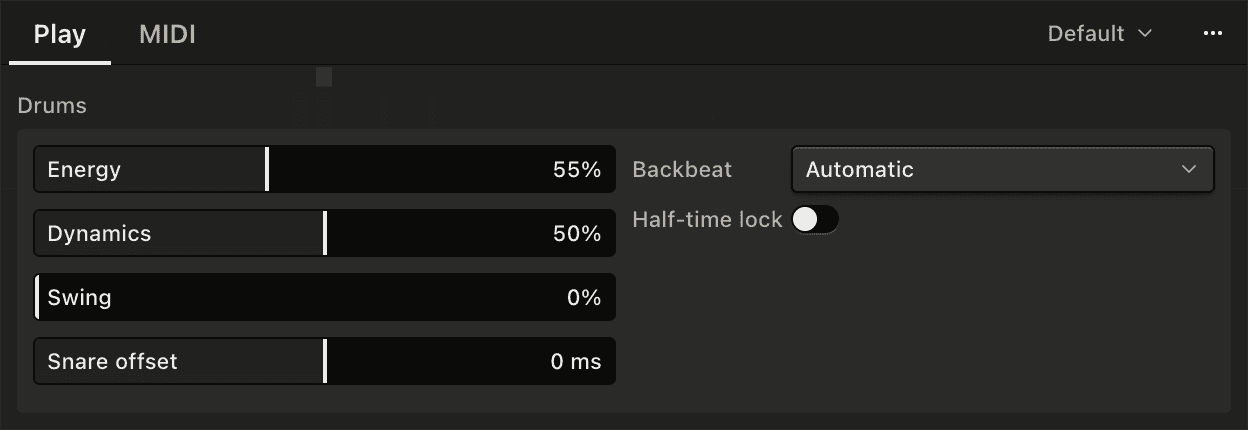
| Control | What it does |
|---|---|
| Energy | The velocity the drums play at with a stick pushed all the way out. |
| Dynamics | The velocity difference between accented and unaccented hits, with a stick pushed all the way out. Lower values make it smaller, higher values make it bigger. |
| Swing | Pushes the offbeat hits late. Zero is straight, and the maximum is a full triplet feel. |
| Snare offset | Moves the snare up to 12ms earlier or later than the rest of the kit. |
| Half-time lock | The drums play at half the tempo. |
The sliders set how the drums play with a stick pushed all the way out. Easing a stick in brings its part's velocity down under the Energy setting, by about a third at the most, and widens the gap between its accented and unaccented hits. Push it all the way out again to go back to the slider settings. The left stick does this for the hi-hat, the right stick for the kick, and with Backbeat set to Manual the right trigger does it for the snare. The four buttons and the d-pad always play at the sliders' settings.
Dynamics and tempo
The Dynamics range also changes with tempo. Slow grooves get a bigger difference between accented and unaccented hits, and fast grooves a smaller one. The middle of the slider is the default.
Swing
Swing pushes the offbeats late, towards a triplet feel. The whole kit swings together.
Swing and tempo
At slow tempos Swing moves the 16ths, and from about 105bpm it moves the 8ths.
Snare offset
At zero the snare plays on the beat with the kick and hi-hat. Turn it down to play the snare slightly early, up to play it slightly late.
Half-time lock
With the switch on, the drums run at half the song's tempo, so one of their bars lasts as long as two of your project's bars, and they play the patterns for that slower tempo. At 170bpm in half-time you get the 85bpm patterns for the kick, hat and snare. Holding the left shoulder button can be used on top of it.
Other drum settings
The Backbeat setting - Automatic, on a stick pushed all the way out, or Manual on the right trigger - is on the Play tab too. The four notes, the channels, the crossfader and the signals are on the MIDI tab. Backbeat and Drums channels are also in the Instrument menu.
The sliders can also be controlled by MIDI CCs from your DAW - see Automation in App settings.
Presets
The menu at the top of the panel saves everything on it as a preset, the same way as Chords presets. You can also switch them from Instrument → Drums Preset in the menu bar.