Finding more chords
Wouldn't it suck if everything was just I–V–vi–IV all the time?
The wheel shows six chords at a time, arranged in layers that you can access by holding down a shoulder button or clicking and holding L3.
Dominant and parallel
The wheel's six chords change depending on which shoulder button you're holding. Home is the key's own chords, and the wheel shows it when neither shoulder button is held. Hold a shoulder button to see Dominant or Parallel, and let go to come back to Home.
Home
Home has the key's six main chords with the tonic at the top. This is the wheel from the previous page.
Dominant: hold the right shoulder button
Hold R1 and every wedge turns into the dominant seventh of whatever the Home chord is in that same position. In C Major, C becomes G7 and Am becomes E7.
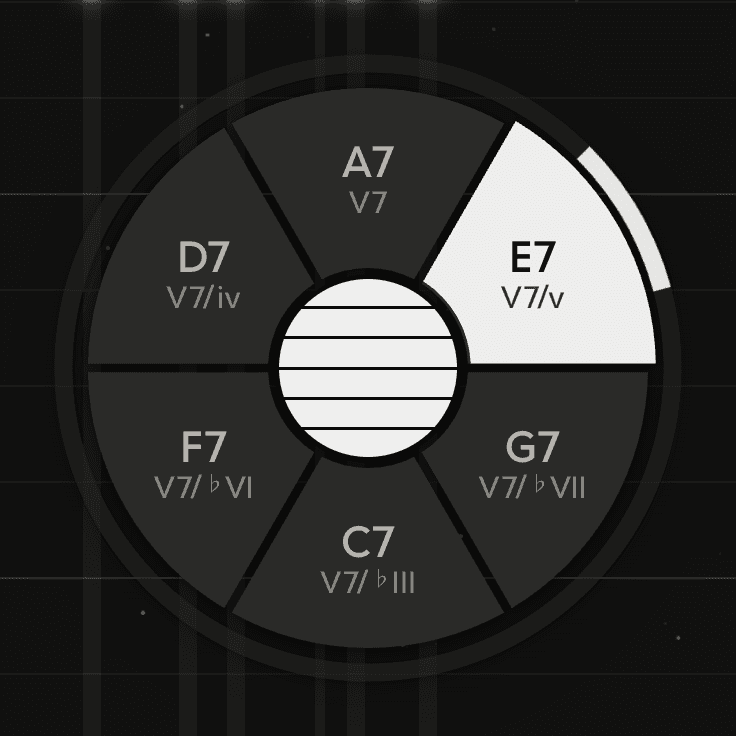
Each wedge is in the same place in both, so you can point at the chord you want, strum with the shoulder button held, let go, and strum again to resolve it.
- Minor keys use the major dominant. In D Minor the tonic position shows A7, with the raised third.
- The Home wheel doesn't have seventh chords. Hold the shoulder button for the sevenths, then let go and strum again to resolve them.
Parallel: hold the left shoulder button
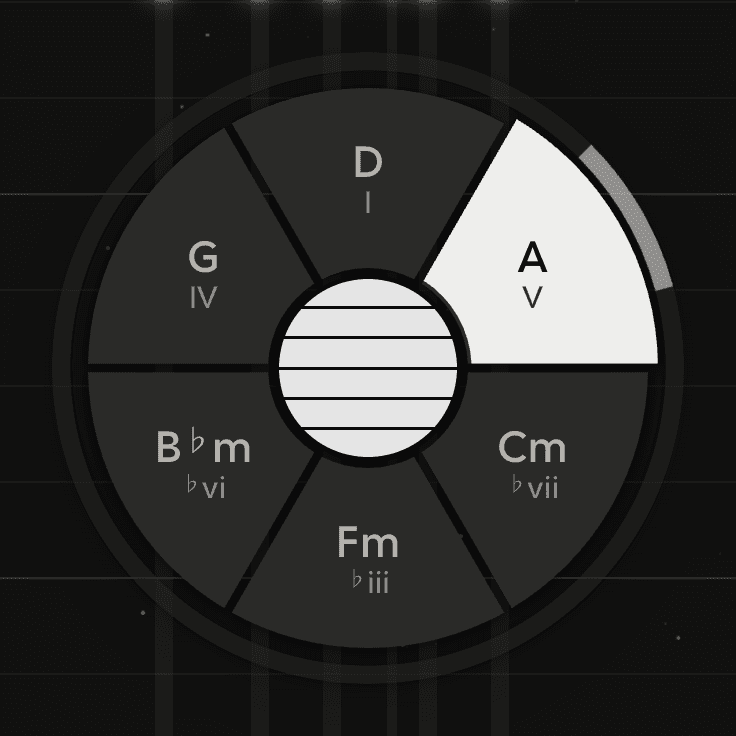
Hold L1 and every wedge turns into the Home chord in the same position with major and minor swapped, keeping the same root and the same place on the wheel. From C Major's wheel, C becomes Cm, Dm becomes D, Em becomes E.
Borrowed chords
Swapping major and minor like this gives you borrowed chords, like the minor iv in a major key or the major IV in a minor one, without changing key.
Letting go
Let the shoulder button go and the wheel returns to Home. Hold both shoulder buttons to show the one you pressed last, and release it to show the other.
The shoulder buttons only change what the next strum plays. Chords that are already ringing aren't affected.
Picking other chords for the shoulder buttons
By default, R1 shows Dominant and L1 shows Parallel. To change them, use L1 visits and R1 visits under Chord wheel on the Play tab of the Chords panel. In every set, each chord is in the same wedge as the Home chord it relates to.
| Set | Each wedge shows |
|---|---|
| Dominant | The dominant seventh that resolves to the Home chord |
| Parallel | The Home chord with major and minor swapped |
| Diminished | The diminished seventh a semitone below the Home chord, leading up into it |
| Supertonic | The ii chord of the Home chord, the first half of a ii-V-I |
| Tritone | The tritone substitute: a dominant seventh a semitone above the Home chord |
| Subdominant | The chord a fourth above the Home chord, major or minor to match |
| Relative | The relative minor of a major chord, or the relative major of a minor one |
| Sevenths | The Home chord with the key's own seventh added |
Suspensions and sevenths
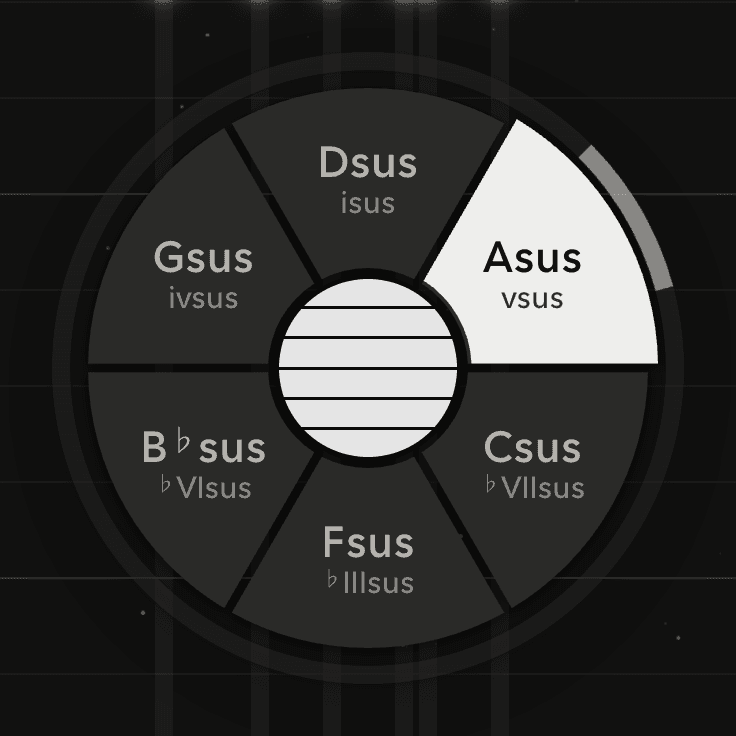
Hold the left stick in - L3 - and whichever wheel you're looking at (Home, Dominant or Parallel) swaps its chords for suspensions or sevenths.
Which chords you get
| Wheel | Held with L3 |
|---|---|
| Home | Suspended chords. Each triad's third becomes the fourth |
| Dominant | Suspended dominants. V7sus in every position |
| Parallel | Sevenths. Each parallel chord with a flat seventh added: a dominant 7 on the major ones, an m7 on the minor ones |
Changing what L3 adds
L3 on Home, L3 on L1 and L3 on R1, under Chord wheel on the Play tab, set what holding L3 does on each wheel. The options are Sus4, Sus2, Flat 7, Major 7, Sixth, Add 9, Diminished and Augmented. The table above shows the defaults.
Releasing one at a time
The shoulder buttons and L3 can be held together. Release them one at a time to move the harmony one step at a time. Here is one example with the stick held at the tonic position throughout:
- Hold the right shoulder button R1 and the stick click L3: strum V7sus.
- Release the stick click, keep the shoulder button: strum V7.
- Release the shoulder button: strum home.
Every combination of shoulder button and stick click works the same way.